

StarboardLog product
One place to manage your vessels, bookings and operations.
StarboardLog brings the everyday records behind a boat or yacht into one connected workspace — from bookings and usage to maintenance, documents, issues, ownership and expenses.
Built for charter operators, boat rentals, clubs, shared ownership and private fleets.
More than a booking calendar.
A booking is only one part of managing a vessel. Hours need to be recorded. Issues need to reach the right people. Maintenance creates history and costs. Documents expire. Owners may need to split expenses.
StarboardLog keeps those records connected to the vessel they belong to, so you can follow what happened without rebuilding the story from separate calendars, spreadsheets, messages and folders.
- 1Book
- 2Use
- 3Report
- 4Maintain
- 5Record
Fleet calendar
See your fleet schedule in one place.
Plan vessel activity from a shared calendar built around the fleet. Charter and rental bookings, owner use, club use, maintenance and other booking types stay visible in one schedule.
See who is using each vessel and when, move between weekly and monthly views, and keep unavailable vessels out of new bookings.
- Multi-vessel scheduling
- Charter / Rental, Owner use, Club use, Maintenance and Other booking types
- Vessel availability controls
- Customer-linked charter bookings

Vessel records
Give every vessel its own operational record.
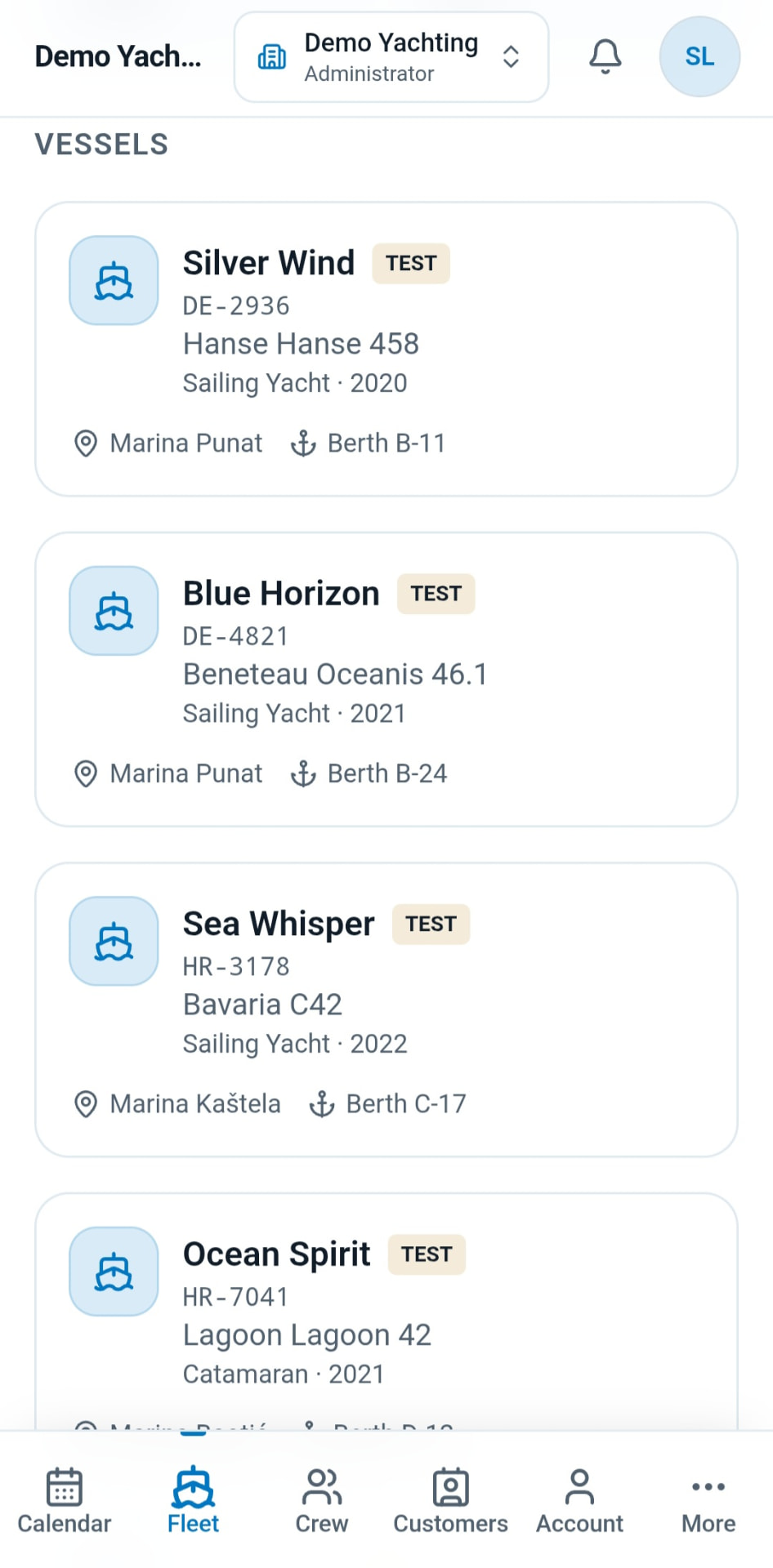
Each vessel has one place for the information that follows it through day-to-day operation: maintenance, issues, usage, components, documents, ownership, expenses and timeline history.
Instead of treating bookings, maintenance and costs as separate systems, StarboardLog connects them through the vessel.
- Maintenance
- Issues
- Usage
- Components
- Documents
- Ownership
- Expenses
- Timeline
Usage tracking
Record what was actually used — not just what was booked.
Booking duration and actual vessel usage are not always the same. Record engine hours and other configured counters after use, while keeping the entry connected to the relevant vessel and booking.
Corrections preserve the record instead of silently replacing the original value, giving you a clearer operational history.
- Vessel counters
- Booking-linked usage
- Automatic usage deltas
- Controlled corrections

Issue management
Turn reported problems into trackable work.
Record issues against a vessel with a title, description and priority, then follow them from report through maintenance and review.
Issues can be assigned to maintenance crew, commented on and used to control vessel availability when a problem should prevent new bookings.
- Issue reporting
- Priority and status tracking
- Maintenance assignment
- Availability control

Maintenance
Keep maintenance history connected to the vessel.
Record completed maintenance and costs, track maintenance requirements and keep the work alongside the vessel's wider operational history.
Maintenance does not live in isolation. It can connect with reported issues, vessel counters, expenses and the timeline, making it easier to understand why work happened and what it cost.
- Maintenance requirements and alerts
- Maintenance history
- Counter and calendar-based limits
- Maintenance cost records
- Issue-to-maintenance workflow
Vessel documents
Keep important vessel documents organised and visible.
Track registrations, insurance, marina agreements, certificates, manuals and other vessel records from the vessel profile.
Add expiry dates where relevant and see what is current, what has no expiry and what needs attention. With Google Drive integration, files stay in your own Drive while StarboardLog keeps the operational record connected to the vessel.
- Marine document categories
- Expiry tracking
- Renewal history
- Search and filtering
- Google Drive integration

Guest access
Give guests the information they need — without creating an account.
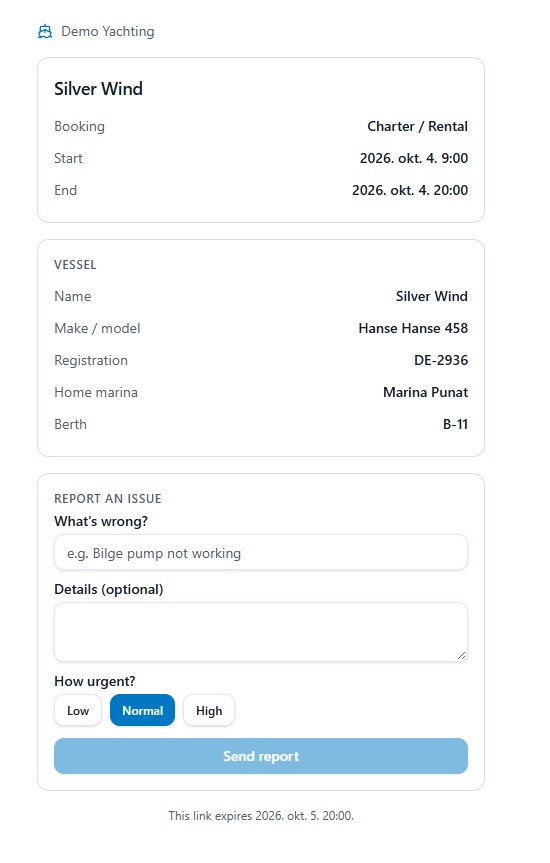
Create a booking-specific Guest Access link that shows the relevant booking and vessel information in a simple guest view.
Guests can report an issue directly from the link, helping the operator receive structured feedback against the correct booking and vessel.
- No StarboardLog account required
- Booking-specific access
- Vessel and booking details
- Guest issue reporting
- Expiring and revocable links
Shared ownership
Manage shared vessels without the spreadsheet.
Record vessel ownership percentages and see how each owner is using the boat over a selected period.
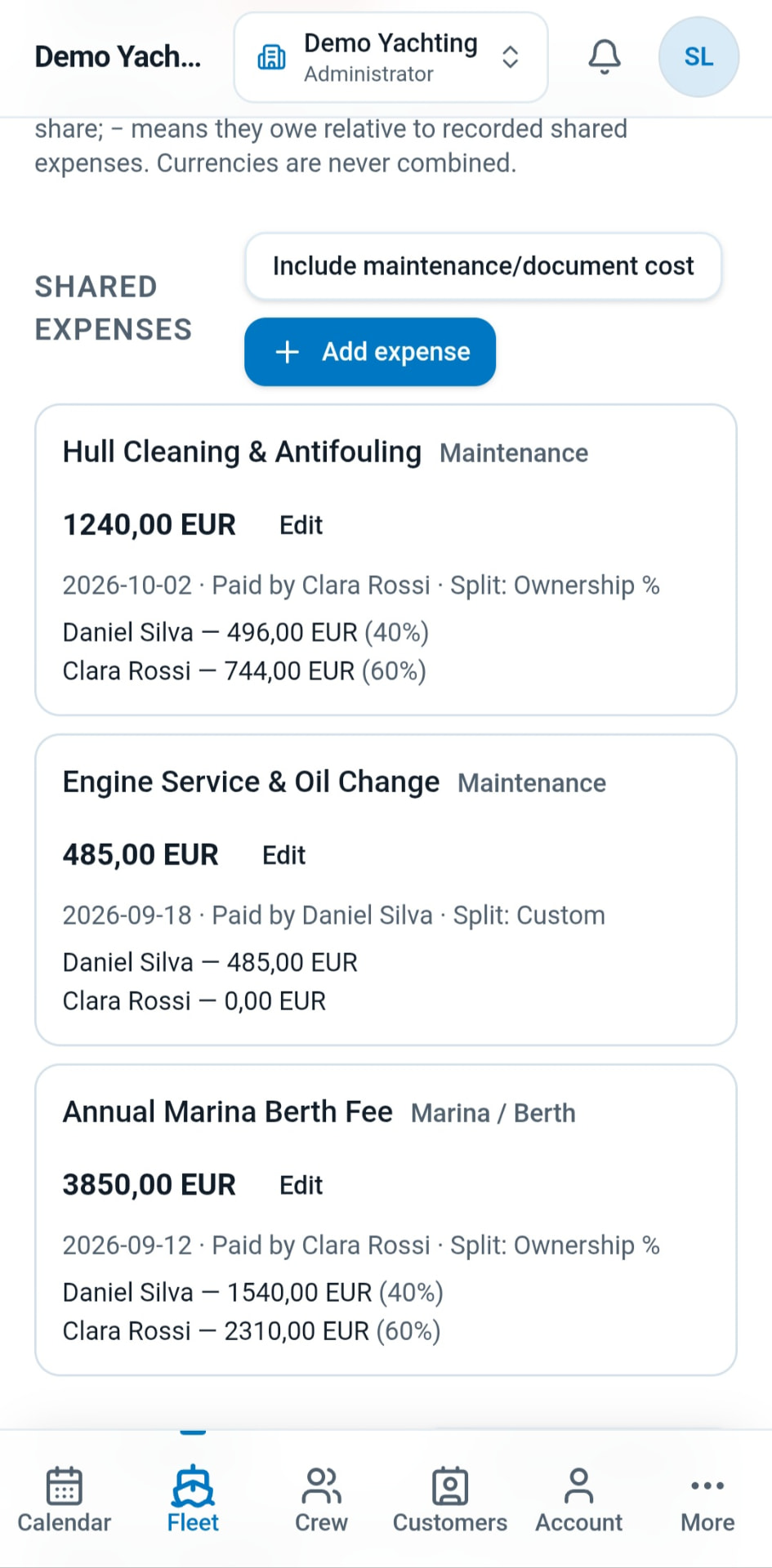
StarboardLog combines booking activity, actual recorded usage and shared expenses so co-owners can understand both vessel use and their financial position.
- Ownership percentages
- Owner booking statistics
- Actual usage by owner
- Shared expense allocation
- Owner balances

Expense tracking
See what the vessel is costing — without counting the same expense twice.
Bring maintenance costs, document costs and standalone shared expenses into one vessel expense view, with period and currency filters and CSV export.
Shared expenses remain available for owner allocation, while costs linked to their original maintenance or document record are reported once through that source.
- Maintenance costs
- Document costs
- Shared expenses
- Period and currency filters
- CSV export
- Workspace-wide expense reporting

Vessel timeline
See the vessel's story in chronological order.
StarboardLog automatically brings key vessel records into a read-only timeline, making it easier to understand what happened and when.
Bookings, usage entries, issues, maintenance, documents and shared costs can be viewed as part of one chronological vessel history.
- Automatic vessel history
- Booking events
- Usage records
- Issue and maintenance activity
- Document events
- Shared costs

One vessel. One connected history.
The value of StarboardLog is not just in each individual tool. It is in the connections between them.
- 1A booking can identify who used the vessel.
- 2Usage records what actually happened.
- 3A guest or crew member can report an issue.
- 4That issue can become maintenance.
- 5Maintenance can carry a cost.
- 6A shared cost can be allocated between owners.
- 7Documents, costs and operational events remain part of the vessel's history.
The result is a clearer record of the vessel without maintaining the same information in multiple places.
Built for the way boats are actually managed.
Charter & rental operators
Coordinate vessel bookings, customers, usage, issues, maintenance and operating records from one workspace.
Boat clubs
Keep shared schedules, vessel records and operational history organised across the fleet.
Shared ownership
Track owner usage, shared costs, allocations and balances around the same vessel record.
Private & small fleets
Keep multiple vessels, documents, maintenance, usage and expenses organised without building your own spreadsheet system.
Ready to see it in action?
Explore a ready-made StarboardLog workspace and try the real product as an Administrator or Crew member. No signup required.
Bring your fleet records together.
Start with your vessels and bookings, then keep the operational history connected as your fleet works.
No credit card required for the trial.